
Testing Strategies for Developers
Learn TDD techniques for new features, changes, and refactoring. Let your work stand out with automated testing strategies

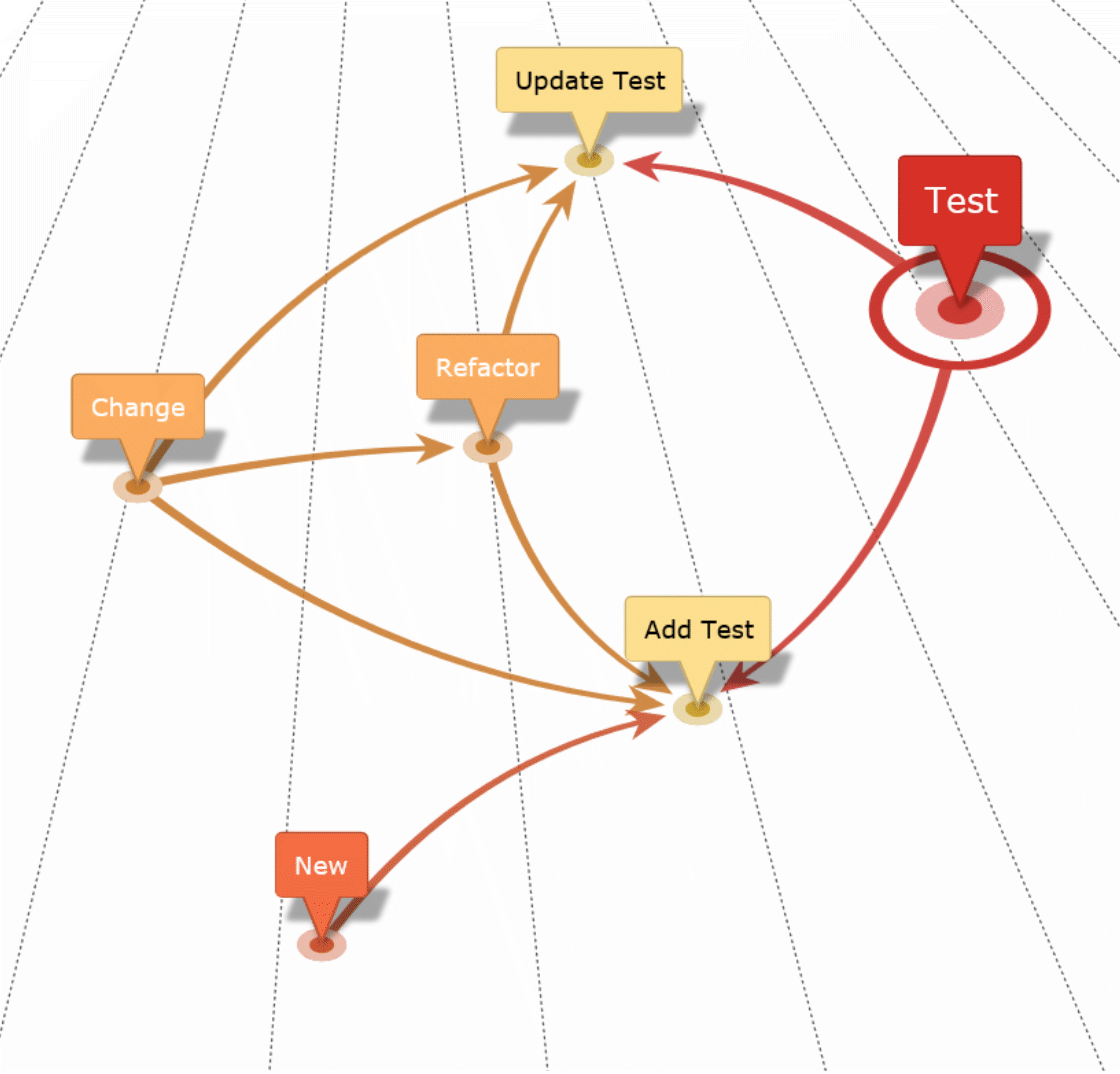
Modern software development requires Test-Driven Development (TDD). It isn't just a technique—it’s a foundational practice that drives quality and speed. For junior and mid-level engineers, mastering TDD can be a game-changer, providing a structured approach to building reliable software. This guide will help you apply TDD across three common development scenarios: new work, changes, and refactoring.
TDD is a talent amplifier - David Farley
Practicing TDD means writing the tests first, guiding the code and ensuring that it aligns with the desired behavior from the start. This approach not only clarifies requirements for new features but also safeguards against regressions when making changes. When it comes to refactoring, a robust test suite built through TDD serves as a safety net, confirming that structural improvements don’t alter existing functionality.
Throughout this guide, we'll cover practical testing strategies for these scenarios, with a focus on automated unit testing, integration testing, and Acceptance Testing. We'll delve into using Acceptance Tests at the HTTP layer to validate system behaviors, bypassing the complexity of UI tests while still ensuring comprehensive coverage of application and business logic.
You'll walk away with actionable insights on leveraging TDD to tackle common development tasks more effectively. Plus, if you're eager to dive deeper, we continue to offer advanced topics and real-world case studies available in our premium content.
Test-Driven Development for New Work
When adding new features or functionality, TDD serves as the ideal approach for building high-quality software. Following TDD means starting with tests that define what the new code should accomplish, guiding the development and setting a strong foundation. This process clarifies requirements early on, allowing you to identify issues before implementation, leading to cleaner and more maintainable code.
By adopting the "Red-Green-Refactor" cycle as a standard workflow—where you first write a failing test (Red), implement code to make it pass (Green), and then refactor for clarity and efficiency—you ensure quality is built into every stage of the development process. This way, you’re not just writing code; you're systematically creating tests that validate it, catching issues before they ever reach production.
Unit Tests as the Foundation
Use automated unit tests for small, isolated parts of the new functionality, such as individual functions or classes. These tests act as the foundation, providing fast feedback that helps detect issues at the earliest stage. Unit tests should cover edge cases and expected behaviors, laying a strong groundwork for more complex tests.
Integration Tests to Confirm Interactions
Automated integration tests validate how different parts of the system work together. Integration testing is especially important when the new functionality relies on external dependencies like databases, services, or third-party APIs. Use automated tools to confirm that data flows and interactions meet expectations, ensuring stability in a broader system context.
Acceptance Tests for Business Validation
In TDD, Acceptance Tests play a crucial role in validating that the new feature aligns with specifications. Instead of relying on UI tests, focus on Acceptance Testing at the HTTP layer by simulating API requests and verifying responses. This approach allows for comprehensive testing of business logic without the overhead of UI interactions.
Focus on Behavior Over Implementation
Tests should verify that the system behaves as expected under various scenarios, regardless of how the functionality is implemented. Use automated tools to validate responses against expected outcomes, ensuring that the solution meets the intended requirements.
Example: Adding a New REST API Endpoint with TDD
Let’s walk through a step-by-step process to illustrate TDD in action:
Step 1: Write an Acceptance Test for the New API Endpoint
Define the expected HTTP response, including status codes, data format, and error conditions. This Acceptance Test will fail initially, indicating that the feature is not yet implemented.Step 2: Implement the Minimal Code to Pass the Test
Leverage lower-level test-driven development to write the simplest implementation needed to make the Acceptance Test pass. Focus on fulfilling the test requirements without adding extra features.Step 3: Refactor the Code, Keeping All Tests Green
With both Acceptance and unit tests in place, safely refactor the code to improve readability and performance while ensuring that all tests continue to pass. Using Red-Green-Refactor, the code will already be in a better place ready for further refactoring.
Best Practices for New Work in TDD
Begin with simple tests for the core functionality and incrementally add more detailed tests as needed. This approach helps avoid overcomplicating the implementation.
Use Acceptance Tests to validate critical business outcomes, while employing unit and integration tests for more detailed aspects. This layered approach ensures that all bases are covered without duplicating effort.
Embrace the iterative nature of TDD by cycling through writing tests, implementing code, and refactoring frequently.
Looking to Go Deeper?
For those interested in advanced topics, our premium content continues to dive into more advanced concepts and strategies for software engineers and architects.
Test-Driven Development for Changes
In software development, change is inevitable. Whether you're enhancing features, fixing bugs, or adapting to evolving requirements, updating existing code is a constant part of the process. When following TDD, making changes always begins with writing tests to reflect the desired outcomes before modifying any code. This test-first mindset clarifies the intended behavior, provides a target for development, and helps catch regressions early.
By consistently applying TDD to manage changes, you ensure that every modification is thoroughly tested, minimizing the risk of breaking existing functionality. When new behaviors are introduced or existing ones are modified, TDD turns the test suite into a safety net that catches any unintended side effects before they cause problems in production.
Add New Tests for New or Enhanced Behaviors
If you're introducing new behaviors, start with a failing test that defines the expected outcomes. This approach ensures that the new functionality is tested from the beginning, providing a clear goal for development.
For example, when adding a new parameter to an existing function, write a test that verifies the function behaves correctly with the new input.
Add New Tests for Modified Behavior
When changing existing functionality, your test suite should be updated to match the new requirements. Acceptance Tests should be added first if the externally observable behavior changes, such as an API's response or a business rule. Adding these tests sets the foundation for verifying that the change is implemented correctly.
For example, if an API endpoint is modified to include an additional field in its response, add an Acceptance Test to drive this change, finally validating the presence and format of the new field.
Preventing Regressions with a Test-First Approach
Running the full suite of automated tests frequently ensures that changes don’t inadvertently break existing features. TDD’s test-first approach helps prevent regressions by making inconsistencies or broken behaviors visible early in the development process.
Example: Updating an API’s Response Format
Let's walk through how TDD can guide a common change scenario:
Step 1: Add Acceptance Tests to Reflect the New Format
Add Acceptance Tests to account for the new response structure. For example, if the change introduces a new "status" field in the JSON response, add the test to validate this field's presence, type, and value.Step 2: Implement the Code Changes to Pass the Test
Make the necessary code changes to produce the new response format and run the test suite. The goal is to make the Acceptance Test pass while ensuring that other tests remain green, indicating no unintended side effects.Step 3: Add or Refine Unit Tests for Edge Cases
Use TDD to help drive the implementation of the change and to uncover edge cases. This might involve testing how the API handles different input scenarios that could influence the response format.
Common Pitfalls to Avoid
When changing code, make sure to consider all related tests. Make sure tests always accurately reflect the expected behavior of the code. Don’t forget about the whole test suite.
Always account for edge cases in your tests. With TDD, incorporating tests for edge cases early in the process helps prevent unforeseen issues. Don’t ignore them.
TDD helps mitigate the risk of breaking changes by highlighting failing tests if an unintended change breaks existing functionality. Strategies such as Branch by Abstraction can help insulate existing functionality (and therefore tests) from changes.
Best Practices for Managing Changes with TDD
Treat the automated test suite as living documentation that reflects the current state of the system. It should always accurately reflect the behavior of the system. Use the test suite as a guide.
Continuous testing helps catch regressions early, especially when dealing with complex systems or critical changes. Run the full test suite frequently.
Use feedback from failing tests to refine the test cases and strengthen the test suite. Incorporate feedback loops to improve testing quality.
Looking to Go Further?
If you want to dive deeper into advanced topics, our premium content continues to provide more advanced concepts and strategies for software engineers and architects.
Test-Driven Development for Refactoring
Refactoring is essential for maintaining a clean and healthy codebase. The process involves improving the code's structure and readability without changing its externally observable behavior. When following TDD, refactoring becomes a structured and safe activity, as a robust test suite provides the confidence to make changes without fear of breaking existing functionality.
With TDD, the goal during refactoring is to keep the test suite green, ensuring all tests pass consistently. This approach helps identify any unintended changes early, allowing developers to focus on optimizing the code’s design while maintaining the system’s stability.
Use Characterization Tests for Areas with Insufficient Coverage
If the existing code has limited or no test coverage, start by writing Characterization Tests to document the current behavior. This approach establishes a baseline, making sure that any subsequent changes do not affect the original functionality.
Focus on the most critical use cases first to quickly achieve coverage that reflects the system’s primary behaviors
Keep Tests Green Throughout the Refactor
Maintain a green test suite at all times. If a test fails, stop immediately and investigate the issue to understand whether the refactor unintentionally altered the behavior. Use this as a signal to revisit the changes and ensure that the original behavior is preserved.
Make small, incremental changes rather than large-scale modifications. This minimizes the risk of introducing errors and makes it easier to identify the source of any issues.
Leverage Acceptance Tests to Validate External Behavior
Since refactoring should not change externally visible behavior, Acceptance Tests are critical for validating that the refactor is successful. As long as these tests continue to pass, you can be confident that the business requirements are still being met, even if the internal code structure has changed.
For example, if you are refactoring a data processing service, Acceptance Tests can confirm that all outputs remain consistent despite changes to the internal processing logic.
Example: Refactoring a Service to Improve Maintainability
Let’s break down a step-by-step process to illustrate refactoring using test-driven development:
Step 1: Run the Existing Test Suite to Establish a Baseline
Start by running all Acceptance and unit tests to confirm that the current functionality is stable. This establishes a baseline before making any changes.Step 2: Refactor Incrementally and Run Tests Frequently
Make small, incremental changes to the code, such as renaming methods, extracting functions, or reorganizing class structures. Run the test suite frequently to validate each change and detect any regressions.Step 3: Address Failing Tests Immediately
If a test fails during the refactor, stop and investigate the failure. The test failure may indicate that an unintended behavior change occurred, and adjustments may be needed to restore the original functionality.
Mutation Testing
Tools like Stryker (.NET, JavaScript) help verify the effectiveness of your test suite by introducing small code mutations and checking if the tests detect these changes. This process ensures your tests are thorough and robust.
Static Code Analysis
Using Microsoft’s Roslyn analyzers and other tools like SonarLint can detect code smells, identify duplicated code, and highlight other maintainability issues that may benefit from refactoring.
Common Pitfalls to Avoid
When refactoring code with little or no test coverage, it's crucial to start with Characterization Tests to lock down existing behavior. Don’t skip characterization tests for legacy code.
Large refactors that happen all at once increase the risk of breaking the system. Instead, refactor incrementally and run the tests frequently to catch issues early.
If a test fails, do not proceed with additional changes until the cause is understood and addressed. Failing tests during a refactor indicate that the changes may have inadvertently affected the behavior. Don’t ignore failing tests during a refactor.
Best Practices for Refactoring with TDD
Tackle one change at a time to make it easier to identify and fix issues.
Although refactoring may not always involve writing new tests, sticking to the TDD cycle keeps you in the habit of validating every change. Always use Red-Green-Refactor.
Regularly check test coverage and consider using mutation testing to identify weak spots in your test suite.
Interested in Learning More?
Our premium content continues to offer in-depth guides on advanced concepts and strategies for software engineers and architects.
Best Practices and Recommendations for TDD Testing Strategies
Adopting Test-Driven Development (TDD) effectively involves following a set of best practices that ensure your testing approach remains consistent and valuable over time. Here are the key strategies to help you get the most out of TDD, keeping your codebase robust and your development process efficient.
Write Failing Tests First
Always start by writing a failing test before implementing any code. This approach helps clarify the specific requirements for the feature or change you're working on. Following the "Red-Green-Refactor" cycle ensures that:
Red: You begin with a failing test, highlighting what needs to be addressed.
Green: You implement the minimal amount of code needed to pass the test.
Refactor: You refine the code and the test to improve quality while keeping all tests passing.
When writing failing tests, start with the simplest test case first, then add more complex scenarios as needed. This helps to avoid overcomplicating the initial implementation
Remember that the best, most useful test is one you have seen fail for reasons you expected. Writing a failing test first enables this. This makes for more powerful tests. This raises the confidence level that a passing test is passing because of expected behavior rather than a bad test.
Test External Behavior, Not Internal Implementation
Focus on testing the system's externally observable behavior. This means writing tests that validate the system's outputs based on given inputs, rather than verifying the internal workings of the code. This practice has several benefits:
More Maintainable Tests: Tests that validate external behavior remain valuable even if the internal implementation changes.
Better Alignment with Requirements: Acceptance Tests should reflect the system's business requirements, ensuring that the application behaves as expected from an end-user perspective.
Reduced Test Fragility: Tests that avoid inspecting internal code details are less likely to break due to refactoring.
For example, instead of testing a method’s internal steps, write a test that verifies the expected output for a given input, confirming that the business logic is executed correctly without coupling the test to how to code accomplishes this.
Refactor with Confidence
TDD provides a built-in safety net that enables developers to refactor code without fear of breaking existing functionality. A comprehensive test suite allows you to:
Identify Unintended Side Effects Early: If a refactor causes a test to fail, you can quickly identify and resolve the issue. This places importance on working in small steps.
Continuously Improve Code Quality: Regular refactoring helps keep the codebase clean, making it easier to maintain and extend.
Maintain Feature Stability: As long as all tests continue to pass, you can be confident that the system’s behavior remains consistent.
Refactor incrementally. Make small, manageable changes and run the tests frequently to validate each step. This approach reduces the risk of introducing errors.
Automate Nearly Everything
Automating your testing process is crucial for efficient TDD. Aim to automate the following:
Unit Tests: Run unit tests frequently to validate individual components.
Integration Tests: Automate integration tests to verify that different parts of the system work together correctly.
Acceptance Tests: Automate Acceptance Tests to validate behavior without relying on the UI.
Continuous Integration: Incorporate automated testing into your CI pipeline with tools like Azure DevOps pipelines to ensure tests are executed with every code change.
Set up automated alerts to notify you immediately if a test fails. This ensures that any issues are addressed as soon as they arise.
Common Pitfalls to Avoid
The "Red-Green-Refactor" cycle is essential for continuous improvement. Always take the time to refactor and clean up the code once the tests pass. Do not skip the refactor step.
Avoid writing tests after implementing the code, as this undermines the benefits of TDD and can more likely result in tests that are coupled to the implementation and don’t guide the design. TDD is a test-first approach.
Remember to include tests for edge cases. These scenarios are often overlooked but can cause significant issues if not properly tested.
Looking for Advanced Techniques?
For those seeking deeper insights, our premium content continues to include advanced concepts and strategies for software engineers and architects.
Conclusion
Throughout this guide, we’ve explored how Test-Driven Development (TDD) drives effective testing strategies for new work, changes, and refactoring. By following TDD principles, you make testing a natural part of the development process, ensuring that your code is both reliable and adaptable to changing requirements.
With TDD, you always start by writing tests that specify the desired behavior, then implement just enough code to make those tests pass. This approach makes it easy to catch issues early, keeps the development process focused on meeting real requirements, and allows you to refactor with confidence. Automated testing tools further enhance this workflow by providing immediate feedback and supporting continuous integration, allowing you to maintain a high-quality codebase even as it evolves.
Adopting TDD as a baseline practice turns testing into a habit that streamlines development and promotes high-quality code. When tests are written first and automated wherever possible, you’re not just adding tests—you’re building a safety net that empowers you to innovate without fear of breaking existing functionality.
And don’t forget the Refactor step!
By starting with failing tests, you set clear goals for each piece of code you write. Make testing a routine part of development. Don’t ask for permission to start TDD.
Testing external behavior ensures your code remains flexible and maintainable, even as internal structures change. Focus on behavior over implementation.
Automated tests and continuous integration help catch issues early and reduce downtime, making your development workflow more efficient. Automate for speed and reliability.
TDD gives you the freedom to refactor your code frequently, knowing that a comprehensive test suite will catch any unintended side effects. Refactor safely and confidently with TDD.
Ready to Dive Deeper?
For those looking to elevate their TDD skills, our premium content goes beyond the basics, offering advanced techniques, real-world case studies, and exclusive resources for software engineers and architects looking to grow their career.
Explore our premium resources to gain expert insights and practical tools that will help you master TDD and automated testing strategies.